
This article was created with the AI assistant Claude and published by Peter Hoenig.
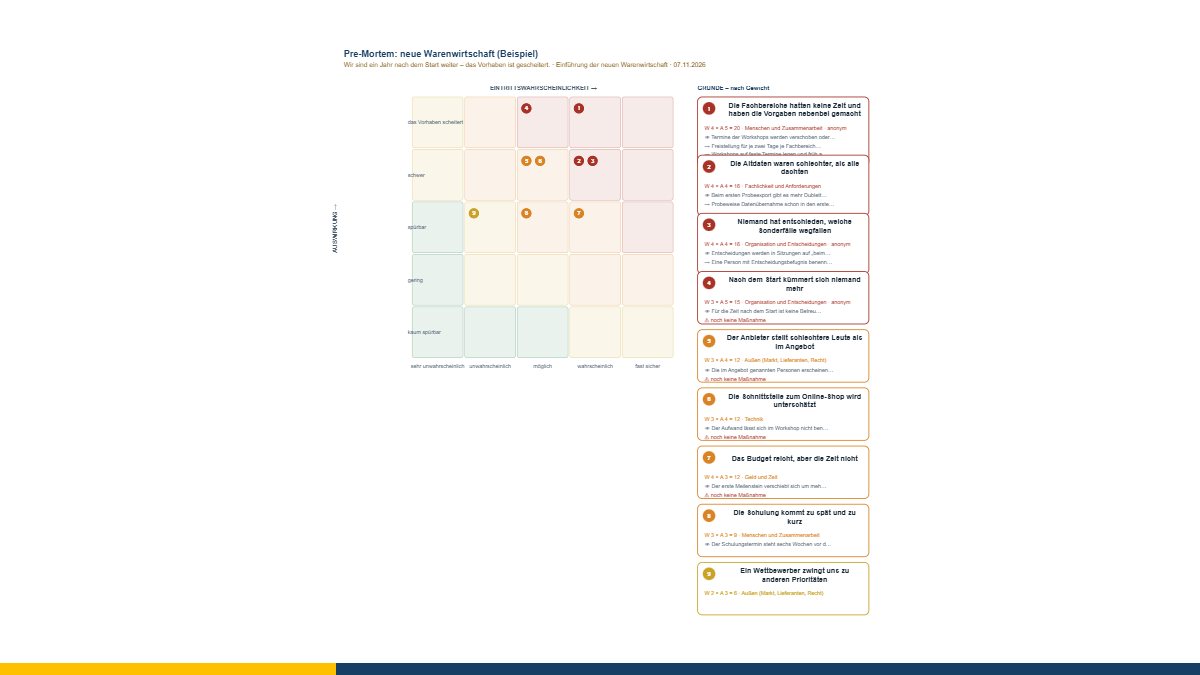
Every project plan has a session on risks. It contains the risks you are allowed to write down: delivery times, technical uncertainties, illness, exchange rates. It does not contain the risks everybody in the room is thinking about – that the departments will have no time, that nobody will decide anything, that after go-live nobody will look after it. Not out of cowardice, but because those things are hard to say in a risk session without meaning somebody.
A pre-mortem solves that with a single change of wording.
Why the reversal works
The method goes back to the psychologist Gary Klein. The trick: instead of asking about a possibility (“what could go wrong?”), it asks for an explanation of a fact (“it went wrong – why?”).
That sounds like word play and changes the conversation considerably. Naming a possibility means exposing yourself: you are making a claim about the future and about people in the room. Explaining a fact, by contrast, is a neutral thinking task. Sentences such as “because the departments did it on the side” or “because nobody decided which special cases would be dropped” can be said without sounding like an accusation.
How a session runs
- Ask the question – and let the room stay silent for a moment. Everyone writes down for themselves why it failed. Only then does the talking start. Without that silence the first person speaks and everyone else varies what they said.
- Collect without assessing. Everything goes on the wall. For this part there is the “collect anonymously” setting: new reasons are then created without a name.
- Assess – together, and only now: likelihood and impact, 1 to 5 each. The reasons move into the matrix.
- Early warning signs per reason. This step is readily skipped and is often worth more than the measure: “workshop dates get moved or attended only by stand-ins” is a sign you can see six weeks before the damage.
- Measures for the heavy reasons – or the deliberate decision “accepted: we live with it”. Both are fine. Leaving it lying there silently is not.
Anonymity has to hold
Reasons collected anonymously stay anonymous – in the tool, in the report and in the hand-over to project management. That is not a technical nicety but a promise on which everything depends. Anyone who later attributes an anonymous reason to a person will hear only the harmless ones next time – and then the session could have been skipped.
A hint that often applies
If not a single reason comes from the area “people and collaboration”, the tool says so. The reason: projects rarely fail on the technology. If a room produces nothing but technical reasons, that is usually not a finding about the project but about the room – and a good reason to hold a second, anonymous round.
And then into the risk register
A pre-mortem whose result stays in a file was an interesting hour. So there are two routes into project management:
- Write into a project file: the reasons are added, with likelihood, impact and measures, to the risk register of a saved project file. The extended file is downloaded; your original stays unchanged. The risks then sit in the risk matrix there and are tracked like all the others.
- Hand over as a project brief: in the same browser, or via the server inside the suite; project management then shows a banner “create as a project”, and the dialog lists the risks with their responsible persons.
With responsible persons: for each reason you record under “Responsible for the risk” who keeps an eye on it – not who raised it; anonymous reasons stay anonymous. If it is missing, the first measure with a responsible person applies. In project management the name then appears in the “Responsible” field of the risk register – as a person of the project: if they already exist (name or initials) they are chosen, otherwise added to the team. If master data are connected there, the new person is linked with the person of the same name in the master data at the next synchronisation.
The other way round, the tool fetches an existing project with its known risks. That is the better way in: you see what is already in the register and then ask about what is not.
You can also hand over the measures themselves as tasks – inside the MC4Y productivity suite to its tasks, otherwise as cards to the Kanban board, prioritised by the weight of the reason. Handing them over again updates them, and their status appears next to the reason.
What a pre-mortem is not
It does not replace risk management, and the assessment is an estimate by the group, not a measurement. It adds to risk management what is systematically missing there: the reasons everybody senses and nobody writes down.
Functions at a glance
- Creating reasons: “Reason for failure” in the left-hand panel or a click in a cell of the matrix – the reason then gets that rating straight away.
- Assessing: “Probability” and “Impact” from 1 to 5 each; the weight is the product (at most 25). Plus “Area”, “Early warning signs” and “Status” – up to “accepted – we live with it”.
- Measures: “+ Measure against it” with “Responsible” and “By when?”; from weight 12 without a measure, the tool points this out.
- Analysis: “Result of the session” with “The most serious” and “Open measures”.
- Output: “Export ▾” as PDF (A4 or A3 landscape), PowerPoint, LibreOffice Impress, Visio, SVG and PNG; “Print report” with picture, all entries and analysis, also as PDF; “Entries as a table (CSV)” for Excel.
- Conversion on handover: project management assesses from 1 to 4 – 1 and 2 become 1, 3 becomes 2, 4 becomes 3, 5 becomes 4. The original value is in the description of the risk.
Integration: maintain once, use everywhere
My principle for all the tools: a piece of information is maintained once and is then available wherever it is needed. For the pre-mortem that means:
- Master data: the owners of the measures – and, where someone does not want to stay anonymous, “Contributed by” – can be linked to the master data.
- CMDB and ITSM: no connection – a pre-mortem looks at a project, not at operations.
- Tasks and Kanban: measures are handed over, ordered by weight, as tasks in the suite or as cards to the Kanban board; the status comes back.
- Project management: the reasons go into the risk register of project management as risks – as a handover with a new project order or directly into an existing project file.
Without the suite everything runs in the browser – via files and handovers within the same browser; nothing leaves your computer.
Frequently asked questions
How do the responsible persons get into the risk register?
For each reason, enter under “Responsible for the risk” who keeps an eye on it. When passing it on – “Write into a project file” or “Hand over as a project brief” – the name lands in the “Responsible” field of the risk register: as an existing person of the project or, if they do not exist there yet, as a new person in the team. If nothing is entered, the first measure with a responsible person applies; if nobody is named there either, the file route enters the project manager.
Does this make anonymous reasons traceable?
No. “Responsible for the risk” is the person who will look after it from now on, not the one who raised the reason. “Contributed by” stays empty for reasons collected anonymously and is not passed on.
The pre-mortem is free of charge and available as free software under the GPL: open the pre-mortem. If you have a project ahead of you where the unspoken things matter, I am happy to facilitate such a session – get in touch for a free initial consultation.
Open or download the tools
- Project managementOpen Download (1.3 MB)
- Kanban boardOpen Download (693 KB)
- Master data (people, roles, organisation)Open Download (681 KB)
- Pre-mortem (finding the risks nobody says out loud)Open Download (800 KB)
Thinking further
You can find more on this topic under project support and coaching – or talk to me directly in a free initial consultation.
Comments
Comments are published immediately with your name. Only the name, title, comment text and time are stored – see the privacy policy.
Loading comments …