
This article was created with the AI assistant Claude and published by Peter Hoenig.
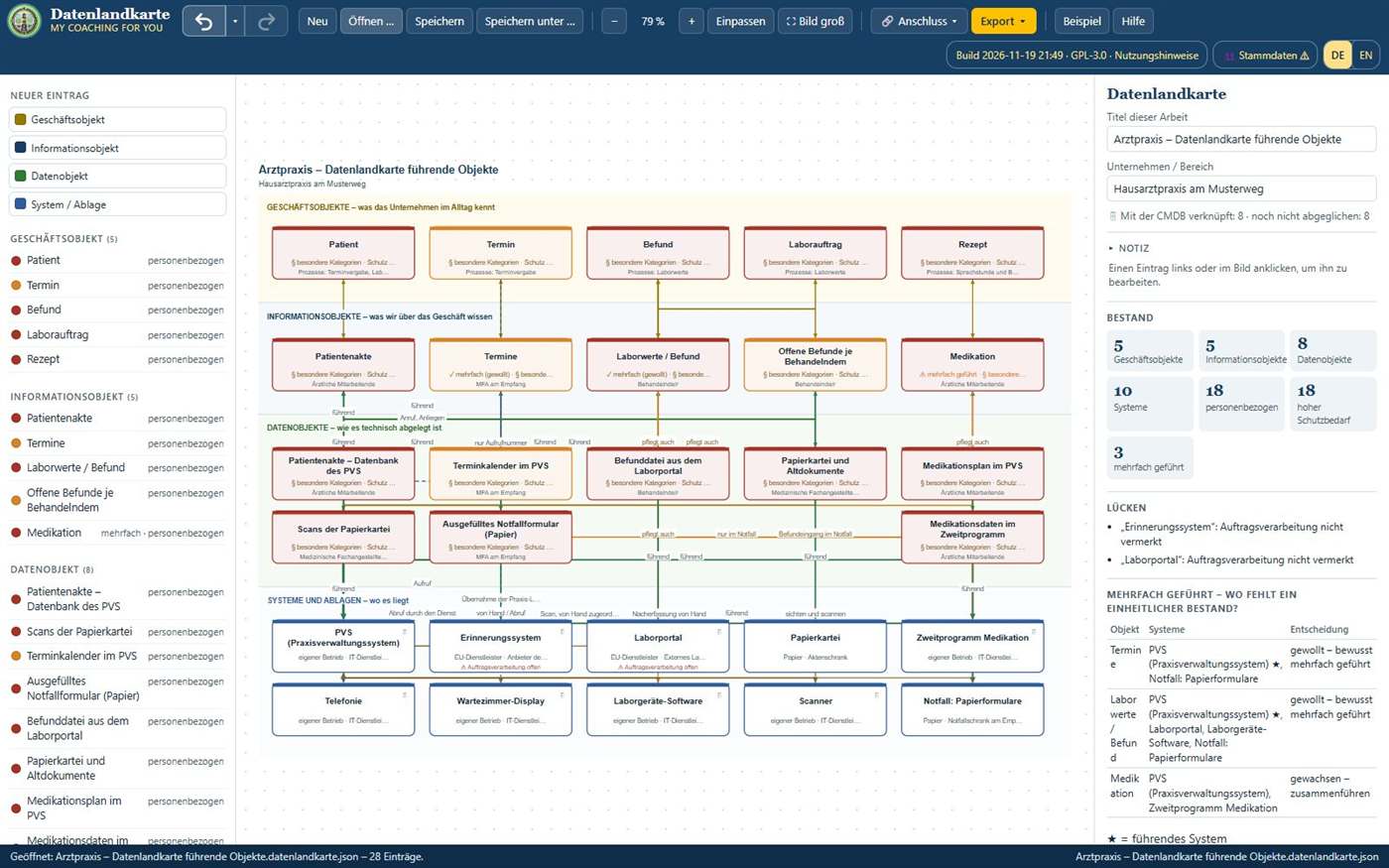
In chapter 20 of the MC4Y Suite practice book a small family practice puts its processes in order: three doctors, five medical assistants, a practice management system (PVS), lab devices and a lot of telephone. This case study is available as ready-made example files – open them in the matching tool and you see what the book describes: from the SIPOC of the three core processes and the 8EM model with BPMN, EPC and SeeMe flows to the question of what happens when the PVS is down.
Download
- Practice book examples – family practice (English, ZIP)
- Praxisbuch-Beispiele Arztpraxis (German, ZIP)
The README in the ZIP lists which file belongs to which tool and which button opens it. The sub-folder “Document store” holds the deputy plan, the emergency concept, the blank emergency form and the findings rule as PDFs.
What you see in the tools
- SIPOC – appointments, lab results and record clean-up as three sheets of one file. Lab results carry the rule from the book: a finding has arrived when it is assigned to the treating doctor in the patient record and – if it is not dealt with at once – has a follow-up.
- 8EM Modeller – the practice with an as-is and a to-be picture: 41 nested capabilities in seven areas, products and two value streams, appointments as a BPMN, lab results as an EPC and record clean-up as a SeeMe model, plus business, information and data objects and a record of processing activities. The four changes are operational goals.
- Data map – which system leads which object: the PVS leads the patient record, medication is maintained twice, lab results live in the lab portal and in the PVS. Which system will lead medication stays an open decision, as in the book.
- IT map – the practice's systems by area, with condition and CMDB ID.
- Outage simulation – when the PVS is down, all four processes examined stop today (the three core processes and keeping the medication up to date); with the emergency concept on paper it is two.
- Kanban – the daily run through findings: the rule “arrived” as done criteria, lanes per treating doctor, follow-ups as due dates.
- Master data – organisation, roles, codes, locations, cost centres and external partners that the other files refer to.
How to open a file: master data first, then call up the tool, choose “Open …” and pick the file from the ZIP. In the 8EM Modeller use “open a single model file (.8em.json)” in the start window.
Frequently asked questions
Do I need the MC4Y Suite? No. The tool files run in the browser without an account. Only calendar, CMDB, tasks and document store need the Suite.
What changed on 20 Nov 2026? The three SIPOC files are now sheets of one file; the IT map, the master data and the PDFs of the document store are new. The 8EM model shows nested capabilities, BPMN, EPC and SeeMe flows, products, value streams, data objects and the record of processing activities.
May I adapt the examples for my own practice? Yes – that is what they are for. Replace roles and systems with your own; patient data stays in the practice management system.
Conclusion
The book explains why three clear processes and four small changes carry more than a big digitalisation project. The example files show what that looks like in the tools – to look at, replay and build on. The book's second example, Wendelmuth Werkzeugmaschinen GmbH, is in the post Practice book example Wendelmuth.
Open or download the tools
- Practice book example family practice (ZIP)Download (329 KB)
- Practice book example family practice (ZIP, German)Download (330 KB)
Thinking further
You can find more on this topic under resources and downloads – or talk to me directly in a free initial consultation.
Comments
Comments are published immediately with your name. Only the name, title, comment text and time are stored – see the privacy policy.
Loading comments …