
This article was created with the AI assistant Claude and published by Peter Hoenig.
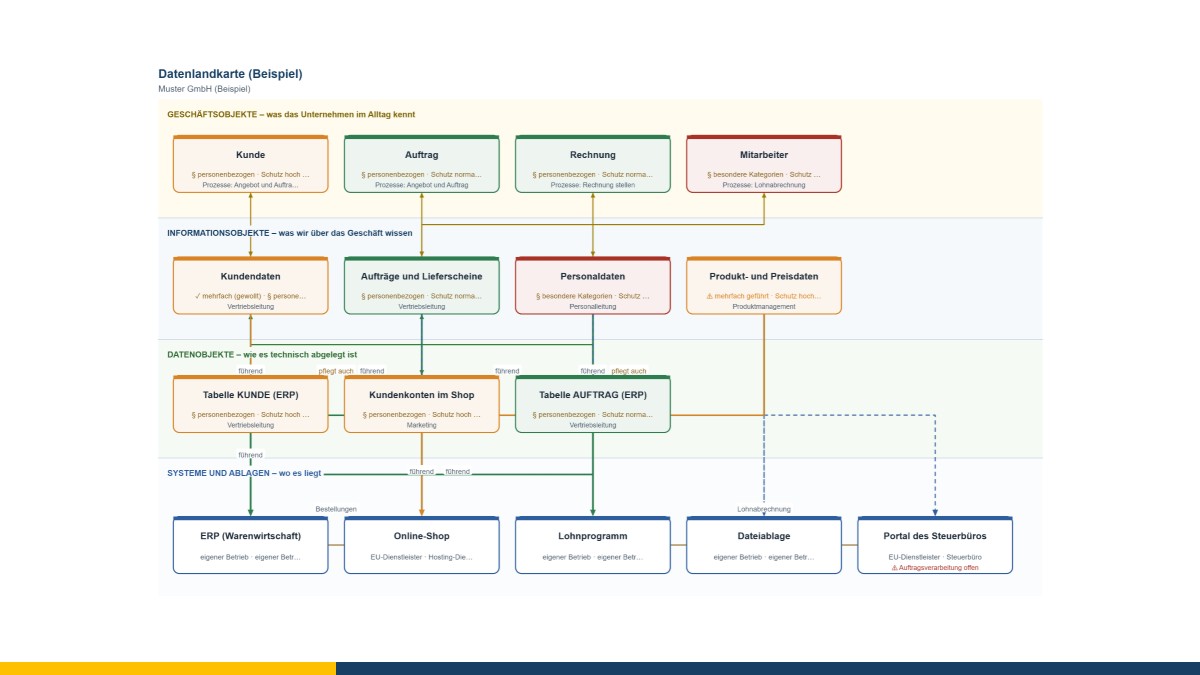
Two very different occasions lead to the same question. One is replacing a system: what actually happens to the data inside the old program? The other is a data protection question: where exactly do our personnel records live?
Both times the first task is the same – write down what information there is, where it lives and who owns it. That is what the data map is for.
Business, information and data objects – why three?
Nobody talks about records in everyday work. People talk about the customer, the order, the invoice – those are the business objects, and they belong to the processes in which they are handled. What someone needs for their work is usually a bundle of them: the customer data with address, contacts and order history – an information object. And technically the whole thing lives in a table, a file, a log – the data objects.
The map shows the three kinds in bands of their own, just as the data model of the 8EM Modeller distinguishes them, and links them: the customer “is represented by” the customer data, the customer data “is stored in” the CUSTOMER table. The lines are double arrows, because the question works in both directions: what does this table stand for? And: where does my customer actually live?
Marking the leading system
For each object and system there is exactly one of three roles: leading – arises here, also maintains it or only reads it. The leading system is where an object is created and authoritatively maintained – and each object has one. If you mark another system as leading, the previous one then “also” maintains the object.
Assigning works in both directions: at the object under “Where is it held? – Systems” or at the system under “Objects in this system”. For a first stocktake the second route is often quicker: go through the systems one by one and mark the objects that are leading there.
Deciding duplicates deliberately
If more than one system creates or maintains the same object, the map reports “kept in several places”. That is the question “five systems, five customer databases?” at a glance. Sometimes it is intended – the shop needs its own customer accounts and is synchronised overnight. Often it has just grown. Under “Kept in several places – decision” you record which applies, with a reason; the evaluation lists every object kept in several places until each one is decided.
Business ownership, not IT
The most important field on the map is an inconspicuous one: business owner. What is meant is a role in the business – sales management for customer data, HR management for personnel data – not IT.
The reason is simple: if nobody from the business is named, operations ends up deciding how long data is kept, who gets access to it and where it is copied. Not out of presumption, but because somebody has to decide. Those decisions belong where the consequences can be judged.
Protection needs, twice
The map asks separately about confidentiality and availability. That is not formalism; it leads to entirely different measures. Pricing data is often highly confidential and highly availability-critical at the same time. Personnel data is very confidential, but a day without access rarely hurts. A single “high protection need” blurs that difference – and leads to doing the same thing everywhere.
Paper and spreadsheets belong in it
The lower level is deliberately called “systems and filing places”. In small and medium-sized companies a considerable part of the important information does not live in a system: in a spreadsheet on a desktop machine, in a folder in a cupboard, in a mailbox. Leave that out and you draw a tidy map that does not describe reality – and that misleads you at the next system replacement.
What the map points out
The tool looks for the gaps that experience shows get expensive:
- An object that lives in no system. Then either a system is missing or the object is not one.
- An object without a leading system – or with several that all create it.
- An object kept in several places that nobody has decided about yet.
- Personal data with no retention period. “How long may and must this be kept?” is rarely quick to answer, but it has to be asked.
- Personal data with no legal basis.
- A provider with no processing agreement noted.
- Personal data on systems outside the EU. That is permissible, but it needs a basis – and should not be overlooked.
The input – and what it is not
The connection produces a table with the personal-data objects and everything this map holds about them. Two columns are deliberately left empty: the categories of data subjects and the purpose of processing. Both belong in a record of processing activities under Art. 30 GDPR but are not collected here.
That is intentional, not an omission. A data map is a working basis from a workshop. It replaces neither the record nor a data protection assessment, and it is not legal advice. What it does: it makes visible what has to be decided, and it supplies half the groundwork.
Connections
From the 8EM modeller come business, information and data objects – each as its own kind – with their protection needs and personal-data flags, plus the IT systems, the relations “is represented by” and “is stored in”, the leading system and the accesses (whoever creates becomes leading, whoever changes also maintains, whoever only reads only reads); linked processes appear at the business object under “In which processes?”. From the IT map come the systems recorded there. The map goes out as tables in the same direction – one per object kind, for the bulk import into the matching sub-level of “Data and information”, where the objects can be linked to processes, systems and interfaces. Inside the MC4Y productivity suite, systems from the CMDB come in as well, with their data relationships as flows; you can write new systems and flows back.
Integration: maintain once, use everywhere
My principle for all the tools: a piece of information is maintained once and is then available wherever it is needed. For the data map that means:
- Master data: the people functionally and technically responsible can be linked to the master data.
- CMDB: systems and stores stay in step with their components in the CMDB (⚠ for those switched off); “supplies data to” becomes “flows to”, and inside the suite new systems and flows can go back.
- ITSM, tasks and Kanban: no direct connection – the map is groundwork for data protection and system planning.
Without the suite everything runs in the browser – via files and handovers within the same browser; nothing leaves your computer.
Frequently asked questions
How do I mark the leading system of an object?
At the object, under “Where is it held? – Systems”, choose “leading – arises here” in the row of the system – or at the system under “Objects in this system”. If the system is not in the list yet, “+ Assign system” or “+ Assign object” adds a row (initially “only reads it”). The line in the picture then reads “leading”.
What happens if two systems create the same object?
The map reports it as “kept in several places” – in the picture with “⚠ kept in several places”, on the right under the gaps and in the table “Kept in several places – where is a single source missing?”. Under “Kept in several places – decision” you record whether it is intended, or has grown and should be merged. If you mark a second system as leading, the previous one then “also” maintains the object.
Do I need all three kinds of object?
No. For a first data protection stocktake, information objects and systems are often enough, as in earlier versions. Business objects pay off when you think from the processes (“where does the customer actually live?”), data objects when a replacement or interfaces are at stake.
Can I still open older data maps?
Yes. Older files open as usual; “arises in” is now called “leading”. Conversely, if an older version of the tool opens a new file, it shows business and data objects as information objects – the new details are also kept in the file and come back the next time it is opened in the new version.
The data map is free of charge and available as free software under the GPL: open the data map. If a system replacement or a data protection stocktake is ahead of you, I am happy to help with the groundwork – get in touch for a free initial consultation.
Open or download the tools
- 8EM modellerOpen Download (3.8 MB)
- IT map in 30 minutesOpen Download (761 KB)
- Master data (people, roles, organisation)Open Download (681 KB)
- Data map (information objects and their systems)Open Download (814 KB)
Thinking further
You can find more on this topic under enterprise architecture management consulting – or talk to me directly in a free initial consultation.
Comments
Comments are published immediately with your name. Only the name, title, comment text and time are stored – see the privacy policy.
Loading comments …