
This article was created with the AI assistant Claude and published by Peter Hoenig.
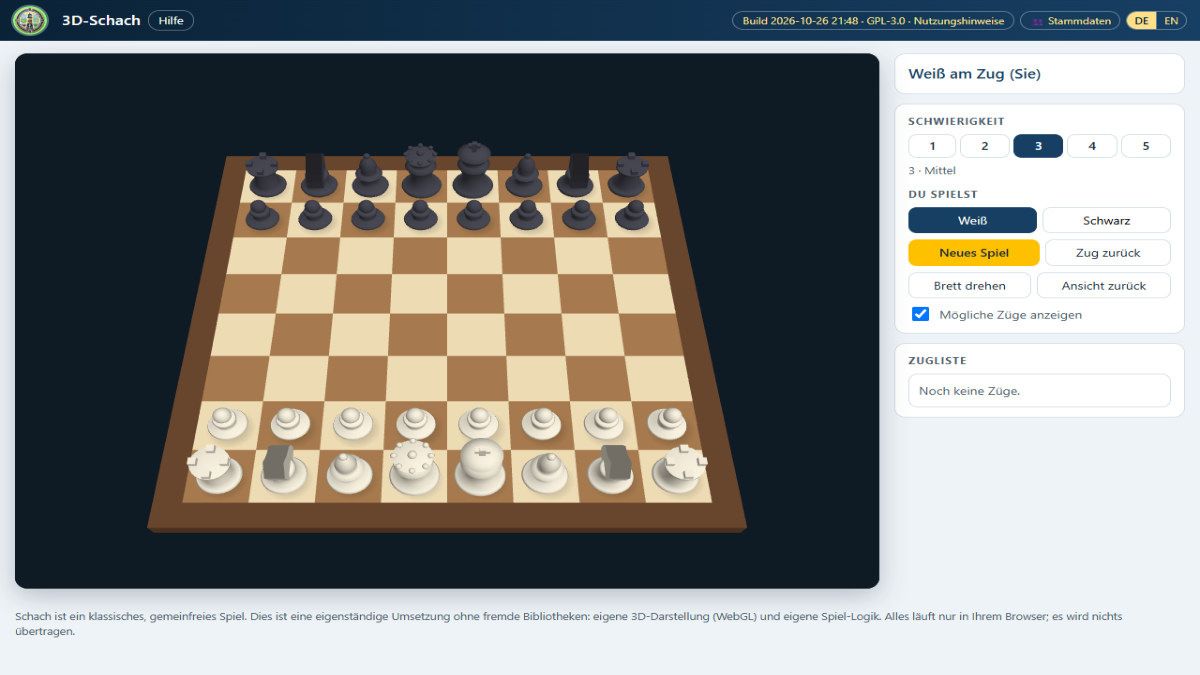
Chess is the classic game for thinking – and a good antidote to the reflex of always reacting at once. In the little collection of games among my tools there is 3D chess against the computer, in its own spatial presentation. It runs in your browser and transmits nothing.
How to play
You play with white against the computer. The possible moves of a piece are shown; the move list keeps track of the game in German notation. Whoever has misjudged something takes the last move back with "take back". The camera can be rotated around the board to view the position from different angles.
Functions at a glance
- “Difficulty”: levels 1 to 5 – Beginner and Easy make deliberate mistakes, Medium looks a few half-moves ahead, Advanced and Hard calculate deeper and need a little time to think.
- “You play”: you choose White or Black and start with “New game”.
- Moving: tap one of your pieces – the target squares are marked (dot = free square, ring = capture) – then the target square. To castle, move the king two squares to the side; on “Promotion” you choose the new piece.
- “Take back”: takes back your last move together with the computer's reply.
- “Rotate board” and “Reset view”: view from the other side or the standard view. Dragging on the board rotates the camera, the mouse wheel or two fingers zoom.
- “Show possible moves”: switches the move hints on or off; level, colour and move hints stay only in your browser.
- “Help” (F1): all rules and controls.
Frequently asked questions
When does a game end in a draw?
If the side to move has no legal move but is not in check, the status line reports “Stalemate – draw”. The game also recognises the fifty-move rule, threefold repetition of a position and insufficient material to give mate; the reason is always shown, for example “Draw (50-move rule)”. After a mate you read “Checkmate – you win!” or “Checkmate – the computer wins.” You cannot resign or offer a draw – “New game” lets you start again at any time.
How do I read the move list?
The move list uses German short notation: K stands for king, D for queen (Dame), T for rook (Turm), L for bishop (Läufer) and S for knight (Springer); for pawn moves only the target square is given, such as e4. An x means a capture (Sxe5, exd5), + check and # mate. O-O is short castling, O-O-O long castling, and =D shows a pawn promoting to a queen.
How do castling, en passant and promotion work?
To castle, tap the king and then its target square two squares to the side; the rook follows by itself. En passant is an ordinary legal move: with move hints switched on, the target square carries a ring like any capture, even though no piece stands there. When a pawn reaches the back rank, the “Promotion” window opens and you choose a queen, rook, bishop or knight.
Is a game in progress saved?
No. The game only remembers the difficulty, your colour and the “Show possible moves” setting – only once you change one of them, and only in your browser. If you reload the page, a new game begins; switching colour also starts a new game straight away.
In short
A complete chess game with its own presentation and its own engine, free of charge as free software under the GPL: Open 3D chess. If you would like to shape your tools and processes in your company so that they serve people, get in touch with me for a free initial consultation.
3D chess is a game for entertainment and practice; the computer engine makes no claim to tournament strength.
Open or download the tool
- 3D Chess (game)Open Download (437 KB)
Thinking further
You can find more on this topic under Ressourcen und Downloads – or talk to me directly in a free initial consultation.